What Is n8n? Workflow Automation Explained
By Rick, NoCode Guide
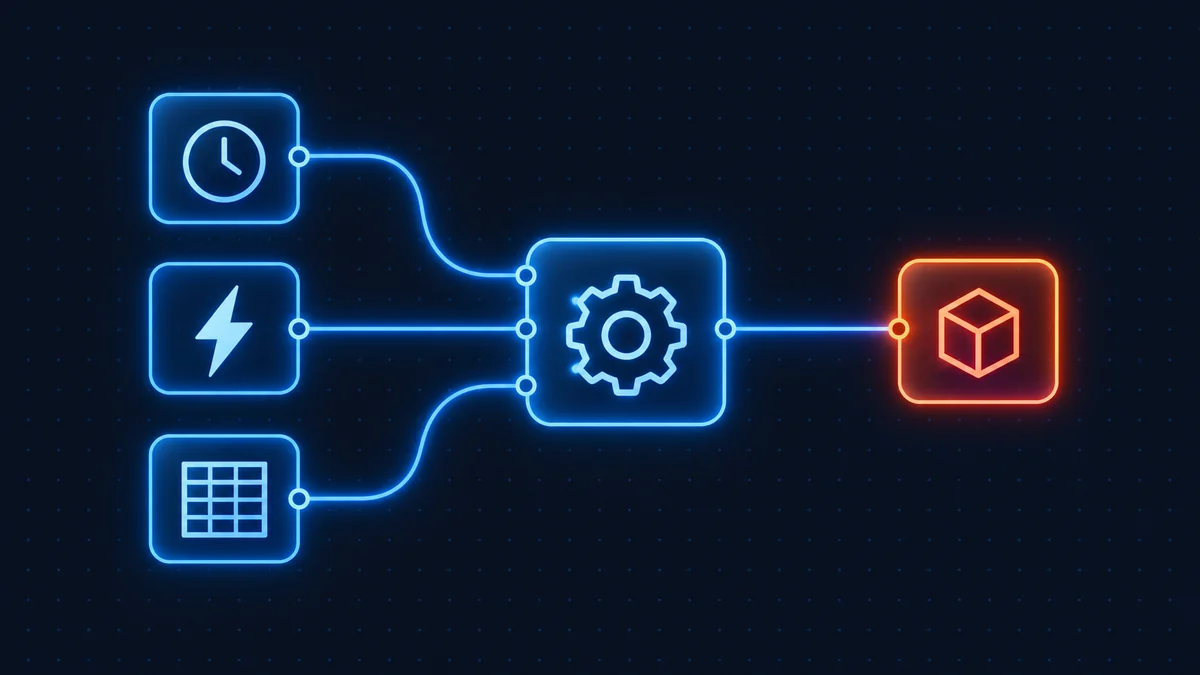
n8n is an open-source workflow automation tool that connects your apps and services so tasks run automatically without you touching them. You build automations visually by dragging and connecting "nodes": a trigger starts the flow, and each following node does something like call an API, transform data, or send a message. It is the leading self-hostable alternative to Zapier and Make.
What does n8n actually do?
Every workflow starts with a trigger, a schedule, an incoming webhook, a new row in a spreadsheet, or a chat message. From there, data flows through action nodes that read, write, filter, or transform it. Because n8n speaks to hundreds of apps and any REST API, you can wire together tools that were never designed to work together.
Common real-world examples:
- Capture a form submission and log it to Google Sheets.
- Auto-reply to WhatsApp messages using an AI model.
- Push server alerts into a Slack channel.
- Summarise long documents with OpenAI and email the result.
Is n8n free?
The Community Edition is free and open source. You can run it on your own machine or a cheap server with no per-task fees. If you prefer not to manage infrastructure, n8n Cloud is the paid managed option. See our full cloud vs self-hosted comparison and the cost calculator to decide.
When should you choose n8n over Zapier or Make?
Pick n8n when you want control, lower cost at scale, or self-hosting for data privacy. Read our detailed n8n vs Zapier and n8n vs Make breakdowns, or browse all n8n alternatives.
How do you get started?
The fastest route is a small VPS: read our install n8n on a VPS guide or the Docker Compose setup. Prefer zero maintenance? Start with n8n Cloud instead.
Learn more
The official documentation at docs.n8n.io covers every node in depth, and the n8n GitHub repository is where the project is developed in the open.
Is n8n free, and is it open source?
These two questions arrive together and have different answers, which is where most confusion starts.
Free: yes, if you self-host. The Community Edition costs nothing, has no cap on executions or workflows, and you can run it on your own hardware indefinitely. n8n Cloud, the hosted version, is paid, with a 14-day trial that does not require a card.
Open source: not quite, and the distinction matters. n8n describes itself as fair-code. The source is public and you can read, modify and run it, but the licence is the Sustainable Use License rather than an OSI-approved open source licence. In plain terms it permits use for your own internal business purposes and for non-commercial or personal use, and it does not permit providing n8n to other people commercially. Running it to operate your own company is fine. Wrapping it in a product and selling that is not, without talking to n8n first. If you need a permissive licence, the alternatives page covers the MIT and Apache-2.0 options.
What people actually use it for
Four shapes cover most real deployments.
Moving data between systems that do not talk to each other. A form submission becomes a CRM record, a spreadsheet row and a notification. This is the bread and butter, and it is where the per-run billing pays off, because the workflow can be as long as it needs to be.
Scheduled jobs without a cron server. Reports, syncs, cleanups and reminders that need to happen on a timetable, built visually instead of as scripts nobody else on the team can maintain.
Internal API glue. The HTTP Request node talks to any documented REST API, so n8n ends up as the integration layer between internal tools that were never designed to connect.
Model-driven workflows. This is the fastest-growing use and the reason a lot of people arrive here. n8n has first-class nodes for language models and agent patterns, so a workflow can call a model, act on the structured result, and loop until a condition is met. Because billing is per workflow run rather than per step, agent loops that would be ruinous on task-billed tools are affordable here.
What it is not
n8n is not a no-code app builder. It does not produce user interfaces, and if what you want is to build an app with screens and forms, this is the wrong category of tool entirely. It automates processes that run in the background.
It is also not a managed service unless you pay for Cloud. Self-hosted means the upgrades, backups, patching and uptime are yours, and n8n's major versions do make breaking changes: 2.0 dropped MySQL and MariaDB support and changed how code execution works. That is a normal cost of self-hosting, but it should be a decision rather than a surprise. The comparison page sets out both sides.
Frequently asked questions
Yes. The self-hosted Community Edition is free and open (fair-code licensed). You only pay for the server you run it on. n8n Cloud is the paid, managed version starting at €20/mo on annual billing.
For technical users and high volumes, usually yes; n8n is cheaper per task and far more flexible. Zapier is simpler for non-technical users with a handful of automations.
No. You build workflows visually by connecting nodes. Code is optional; you can drop into JavaScript or Python only when you need custom logic.
Almost anything with an API: lead capture, notifications, data syncing between apps, AI content generation, scraping, reporting, and complex multi-step business processes.
Cloud is managed for you with execution limits per plan. Self-hosted runs on your own server with unlimited workflows and executions, but you handle updates and maintenance.